
Joulz is a commercial metering service for wholesale connections in the Netherlands.
API key #
Joulz uses an API key as identity verification. This key must be created in the e-Data Portal and is associated with the IP address of the server retrieving the measurement data. This is the server of Meterbeheer. The correct IP address is listed in this manual.
An API key needs to be created only once per e-Data portal.
Subcode #
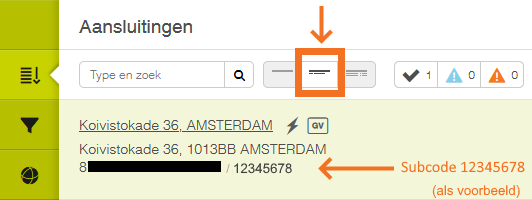
In addition to the (public) EAN of a connection, Joulz identifies a subcode as an additional check. This subcode is unique per connection and is listed in the e-Data Portal at the connection.
For each connection whose metering data is retrieved by Meterbeheer, a unique subcode must be retrieved.
Look up API key and subcode in the e-Data portal #
Step 1. Log in to Joulz’s e-DataPortal via Joulz.nl.
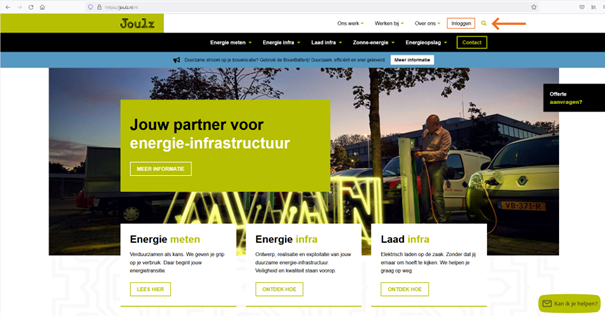
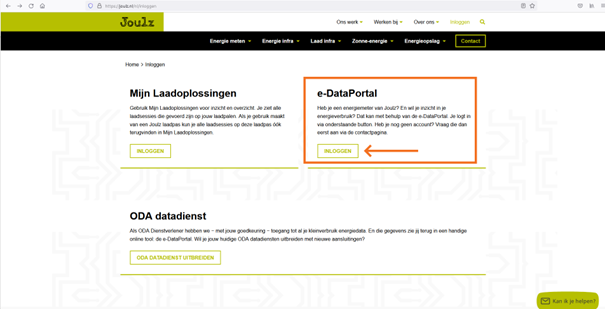
Step 2. Log through the login screen.
Creating the API key #
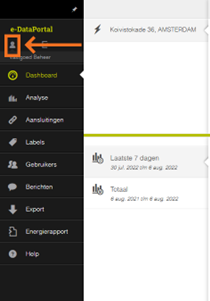
Step 3. Click on the person icon at the top left of the dashboard.
Step 4. Click on the black gear icon.
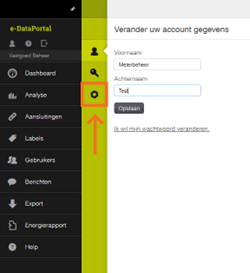
Step 5. Enter the IP address of the Meterbeheer HUB server: 116.203.112.240 and click “Create API Key.”
Entering the correct IP address is essential.
Keep the specified API key safe, for example in a txt or Word file. This key is displayed only once. Save this file in a safe place.
Only one API key needs to be created per Joulz account. Also if multiple meters are read through this account by Meterbeheer.
Retrieve subcode #
Step 6. Open the connection page of the e-DataPortal via “Connections”.
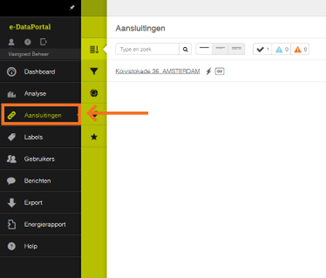
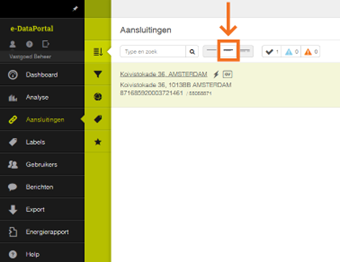
Step 7. Click on highlighted icon to reveal subcode per connection.
Channels #
electricity
- consumption – consumption per 15 minutes (kWh)
- production – feed-in per 15 minutes (kWh)
Gas
- consumption – consumption per hour (m3)
Historical dates #
Meterbeheer offers all data from a Joulz meter from the effective date of when the owner of the connection entered into the contract with Joulz.
Is there data missing in feed? Please contact Joulz at klantenservice@joulz.nl.
API error messages #
If data cannot be retrieved, Joulz returns different types of error messages.
The error message is displayed in the Meterbeheer Dashboard on the page of the corresponding meter. If an API+ subscription is in place, the error message is also shown in the JOSN feed of the connection.
(This data is still being completed.)